eMINTS National Center Portal

  • I'M a(n)...
    • Teacher
    • Trainer / Coach
    • Administrator
    • eMINTS Teacher
    • Affiliate Trainer >
      • Affiliate Resources
      • AT Recertification
    • eMINTS4Admin
  • RESOURCES
    • Resources
    • Coop Lrng Strategies
    • eMINTS Tip Cards
    • Grouping Strategies
    • Learning Ideas
    • Lessons by eMINTS Ts
    • Scaffolds
    • Tech Tools >
      • AI Tools
      • Assessment
      • Collaboration
      • Communication
      • Creativity
      • Critical Thinking
      • Information Literacy
      • Management
      • Productivity
    • CC Licensing
    • Tutorials >
      • Create Google Folder
      • Add Files to Google Folder
      • Share Google Doc
    • Site Search
  • PROGRAMS
    • Programs
    • Affiliate Trainer PD
    • eMINTS Comp PD >
      • Yr 1 Comp Modules
      • Yr 2 Comp Modules
    • eMINTS4All >
      • Yr 1 4All Modules
      • Yr 2 4All Modules
    • Design Through Inquiry >
      • DTI YR 1 & 2 Training Materials
    • ProsocialEd >
      • PE Endorsement
    • eMINTS4Admin PD
  • GRANTS
    • Grants
    • eDGE: eSTEM Designing Games for Education
    • PAL: Prosocial & Active Learning
    • T2R: Talk to Read Collaborative
  • About eMINTS
    • eMINTS Apparel
  • eXpedition
  • I'M a(n)...
    • Teacher
    • Trainer / Coach
    • Administrator
    • eMINTS Teacher
    • Affiliate Trainer >
      • Affiliate Resources
      • AT Recertification
    • eMINTS4Admin
  • RESOURCES
    • Resources
    • Coop Lrng Strategies
    • eMINTS Tip Cards
    • Grouping Strategies
    • Learning Ideas
    • Lessons by eMINTS Ts
    • Scaffolds
    • Tech Tools >
      • AI Tools
      • Assessment
      • Collaboration
      • Communication
      • Creativity
      • Critical Thinking
      • Information Literacy
      • Management
      • Productivity
    • CC Licensing
    • Tutorials >
      • Create Google Folder
      • Add Files to Google Folder
      • Share Google Doc
    • Site Search
  • PROGRAMS
    • Programs
    • Affiliate Trainer PD
    • eMINTS Comp PD >
      • Yr 1 Comp Modules
      • Yr 2 Comp Modules
    • eMINTS4All >
      • Yr 1 4All Modules
      • Yr 2 4All Modules
    • Design Through Inquiry >
      • DTI YR 1 & 2 Training Materials
    • ProsocialEd >
      • PE Endorsement
    • eMINTS4Admin PD
  • GRANTS
    • Grants
    • eDGE: eSTEM Designing Games for Education
    • PAL: Prosocial & Active Learning
    • T2R: Talk to Read Collaborative
  • About eMINTS
    • eMINTS Apparel
  • eXpedition
  • Community of Learners
  • >
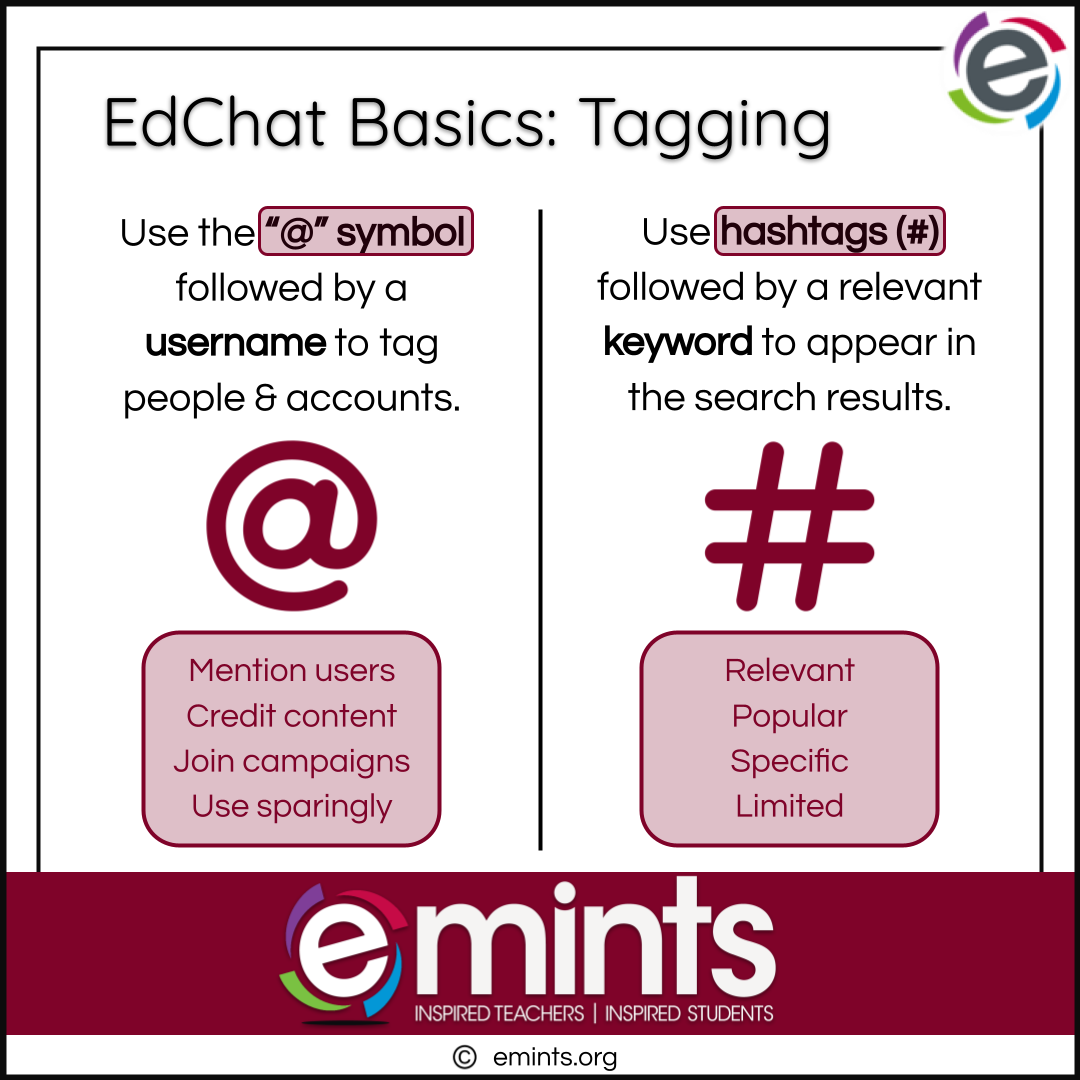
  • Tip: EdChat Basics > Tagging

Tip: EdChat Basics > Tagging

SKU:

Here are a few tips for using tags effectively:


  1. Use tags to mention other users: If you want to draw someone's attention to your post, you can tag them in your post. This is especially useful if you are mentioning someone or quoting them in your post.
  2. Use tags to credit other users: If you are using someone else's content (e.g., a photo, a quote), make sure to credit them by tagging them in your post. This is a good way to show appreciation and build relationships with other users.
  3. Use tags to participate in challenges or campaigns: Many social media campaigns or challenges involve using a specific hashtag and tagging the campaign's account. Participating in these challenges can help you reach a wider audience and engage with other users.
  4. Use tags sparingly: While it may be tempting to tag as many people or accounts as possible, using too many tags can be overwhelming and may make your post look spammy. A good rule of thumb is to use a maximum of 2-3 tags per post.


Here are a few tips for using hashtags effectively:


  1. Use relevant hashtags: Make sure the hashtags you use are relevant to the content of your post. Using irrelevant hashtags can be confusing or annoying to your followers.
  2. Use popular hashtags: If you want your post to be seen by a wider audience, you can use popular hashtags that are being used by a large number of people. However, be aware that your post may get lost in the sea of other posts using the same hashtag.
  3. Use specific hashtags: Using more specific, niche hashtags can help you reach a smaller, more targeted audience. For example, if you are a baker, you might use the hashtag "#veganbaking" instead of just "#baking."
  4. Use a limited number of hashtags: While it may be tempting to use as many hashtags as possible, using too many hashtags can be overwhelming and may make your post look spammy. A good rule of thumb is to use a maximum of 2-3 hashtags per post.


View/Download your EdChat Basics > Tagging Tip Card.

  • Facebook
  • Twitter
  • Pinterest
QUICK LINKS
eMINTS Programs
eMINTS Stories
Resources
Search Site


​​eMINTS eXpedition
Join 
eMINTS Educators' ​​
​Community of Practice


​​ABOUT eMINTS
http://emints.org ​
​ [email protected]


573.882.4694

​Need help? 

​Header Image ​Courtesy of Unsplash
Picture
Picture
©2019-2024 The Curators of the University of Missouri ​